


TripShot
4.6166.00 Reviews
App Specs
- Version
- 126
- Updated On
- License
- Free
- Downloads
- 100,000+
- Developer
- TripShot
- Categories
- Maps & Navigation
- Platform
- Android
Screenshots
 Analysis by AppCompare
I approached TripShot as someone trying to make a real journey less fragmented, rather than as another general-purpose map. It belongs to the Maps & Navigation category, is free to use, and is developed by TripShot. My first impression was that its value depends heavily on the transportation service connected to it: when that service is available, the app can turn a vague “how do I get there?” problem into a more organized trip; when it is not, its usefulness becomes much narrower.
That distinction matters. This is not the kind of navigation app I would automatically choose for every walk, road trip, or unfamiliar city. I see it more as a mobility app built around a particular transport network and the people who use that network regularly. The best experience comes from treating it as the front end for an available service, not as a universal replacement for every map and transit tool on my phone.
From a travel problem to a completed journey
I find the most useful way to judge TripShot is to follow one journey from the first decision to the moment I arrive, rather than treating it as a map in isolation. That makes it easier to see where a service-focused app can save effort—and where I still need a backup plan. Next, I’d look closely at the small handoffs that often determine whether a trip feels straightforward.
Starting with the right expectation
The first practical question is not whether TripShot looks polished. It is whether the transportation organization I need is supported in the app. If I am a commuter, student, employee, resident, or rider using a service that operates through TripShot, the app has a clear purpose. I can open it with a specific journey in mind and use it as the place where trip information and the next action meet.
If I am simply looking for the broadest possible coverage of public transport in an unfamiliar region, I would start with a conventional map or transit app instead. Those tools are generally better suited to comparing many unrelated operators and building a route from a wide range of transport options. TripShot makes more sense when the service itself is the center of the journey.
A useful everyday example is a morning commute. I know where I need to arrive, but I do not want to search through separate messages, remember a pickup arrangement, and guess whether the vehicle serving my route is still relevant. In that situation, a dedicated mobility app can reduce the number of places I need to check. The benefit is not just finding a destination; it is keeping the journey organized from the initial request to the final arrival.
That is also why I would not judge it solely by the short store description. The real question is how well the app handles the handoff between a rider’s intention and the transport service responsible for fulfilling it. A map can show me streets. TripShot is more useful when I need a service-specific path through those streets.
Worth Reading Before You Choose

EA SPORTS FC Mobile 26 Is a Bigger Football Game, but It Takes Time

Flipboard Shows What News Apps Must Do Beyond the Feed

Switching to Android Auto Means Rethinking Your Driving Routine

Google Calendar Makes a Crowded Week Easier to Manage

Ludo King Makes the Most of the Minutes Between Plans

Baby Panda World Brings Quick Play to Modern Phones, but Its Game Library Feels Busy
Building the trip step by step
My recommended workflow starts before I am in a hurry. I would install the app, open it in a calm moment, and identify the transport service or organization I am meant to use. If the app presents a service-specific setup, I would complete that before the day of travel rather than trying to solve access questions at a pickup point. This small preparation step is important because mobility apps are least forgiving when the rider is already late.
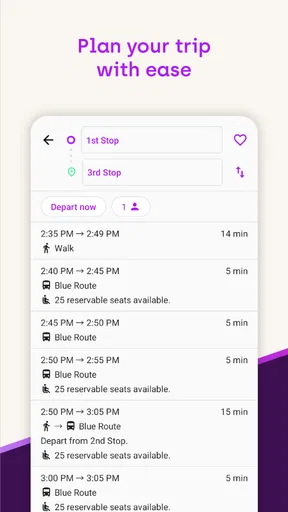
Once the correct service is available, I would enter the journey details the app requests and review the resulting trip carefully. I would look at the starting point, destination, timing, and any pickup or transfer information shown on screen. I would not assume that the first suggested option is automatically the best one. A slightly earlier departure, a shorter walk, or a different transfer can matter more than a small difference in estimated arrival.
For a regular commute, I would also use the first few journeys to learn the rhythm of the service. Is the pickup point easy to reach from the building entrance? Does the displayed meeting location require crossing a busy road? Is the final stop close to the actual destination, or will I still need a walk that should be included in my planning? These are practical questions that a route line alone cannot answer for me.
The most useful habit is to verify the handoff points, not just the final destination. Many travel problems happen between stages: leaving a building, finding a pickup area, changing vehicles, or recognizing the correct stop. I would treat each of those points as part of the route and allow extra attention there, especially on my first trip.
Managing the handoffs
A journey often passes through several responsibilities. I may begin by choosing a ride, then depend on the service operator to provide it, then follow instructions to a pickup location, and finally continue on foot or through another transport option. TripShot’s role is strongest when it keeps these stages connected enough for me to understand what I should do next.
This is where a service-focused app can feel more practical than a generic map. A general map may tell me that two places are connected, but it may not make the relationship between the rider, the scheduled service, and the pickup process feel as direct. TripShot is designed around that mobility workflow, so I would use it as an operational companion rather than merely a map with a search box.
Still, I would keep a backup plan. If my phone battery is low, the pickup area is confusing, or the service changes in a way I do not immediately understand, relying on one app can create unnecessary stress. I would note the destination and approximate timing before leaving, particularly for an appointment or airport-style connection where missing one stage has consequences.
Another useful approach is to separate “where I am going” from “how I am getting there.” I would first confirm the destination and arrival requirement, then inspect the service’s proposed route. This prevents me from accepting a convenient pickup that leaves me with an awkward final walk. It also helps when I am traveling with luggage, mobility limitations, or someone unfamiliar with the area.
What the completed trip feels like
When the workflow goes well, the result is a calmer journey with fewer disconnected decisions. I start with a known transport service, review the route, follow the pickup or transfer instructions, and arrive with a clearer idea of what happens next. That is a modest promise, but it is valuable for recurring travel. I do not need a dramatic feature to appreciate an app that reduces uncertainty at the right moment.
I can see TripShot being particularly useful for organized transportation in workplaces, campuses, residential communities, and other settings where riders use a defined mobility network. In those environments, the app’s value is cumulative. A single trip may save only a little effort, but using one place for repeated journeys can make the routine easier to manage.
The app also has a reasonable entry point for a broad audience: it is rated for Everyone and does not require a purchase price. Its Android listing shows a 4.6 average from around one thousand ratings, with over one hundred thousand installs, which suggests that it has found a meaningful audience without making the app feel restricted to a specialist niche. I would still separate popularity from suitability; those figures do not change the need to check whether the relevant service is available to me.
Where the workflow can break
The largest limitation is structural rather than cosmetic. TripShot cannot make an unavailable transportation service appear in my area. If my employer, campus, community, or local operator does not use the platform, I may open the app and find that it does not solve my immediate travel problem. In that case, a broad transit planner, a regular map, or the operator’s own application may be the better choice.
There is also a learning curve around service-specific language and pickup behavior. A first-time rider may understand the destination but still be unsure where to stand, which entrance to use, or how much walking is expected. I would not blame every difficulty on the app, because some of it belongs to the transport network itself, but the distinction does not help much when I am standing outside looking for a vehicle.
Another friction point is dependence on current information. Any mobility workflow is only as useful as the details I receive at the time I need them. I would check the trip before leaving and avoid treating an earlier plan as permanent. If my schedule changes, I would review the route again rather than relying on memory. This is especially important when the trip includes a handoff to another service.
I would also skip TripShot as my primary tool if my travel style is mostly spontaneous exploration. For wandering through a city, comparing walking with cycling, checking many independent transit agencies, or planning a long multi-city journey, a general map application usually offers a wider view. TripShot’s focused design is an advantage for supported mobility programs, but that same focus limits it as an all-purpose travel planner.
How it compares with familiar alternatives
Compared with a standard map app, TripShot feels more specialized. A map app is usually the stronger choice for discovering businesses, checking walking directions, or combining unrelated transport modes across a large area. TripShot is the more logical choice when I already know the mobility service I need and want the journey organized around that service.
Compared with a traditional public transit planner, the difference is less about the basic idea of routing and more about the relationship with the operator. A transit planner may be better for comparing buses, trains, and agencies across a city. TripShot is better positioned for a defined service where the rider needs a direct connection to the transport program rather than a catalog of every possible route.
Compared with paper schedules, email instructions, or a service’s scattered announcements, the app can provide a more practical starting point for the trip. The trade-off is that I become more dependent on the app and the service maintaining accurate, usable information. I would therefore keep the relevant destination and timing in mind instead of assuming that the application removes the need for judgment.
Device support and everyday fit
On Android, the app supports devices running version 8.0 or later. The current Android version is 126, and the application has been available since June 21, 2015. Those details make it accessible to many users with older supported phones, although I would still keep the operating system updated when possible because navigation and travel tools are more dependable on a maintained device.
The free price makes testing straightforward. I can install it without committing money, check whether my relevant service appears, and decide whether it fits my routine. I would not interpret “free” as a guarantee that every transport service is free; the app’s price and the cost of a ride are separate questions. That is a distinction worth checking before I plan a journey around it.
For privacy and reliability, my practical advice is simple: use the app deliberately. I would review what information I enter, avoid creating a trip I do not intend to take, and keep enough battery for the journey itself. I would also avoid depending on a single screen for a time-critical connection. These are not reasons to reject TripShot; they are sensible habits for any app involved in real-world movement.
Who should use it and who should choose something else
I would recommend TripShot to someone whose workplace, campus, residential community, or transport provider already uses it and who wants one place to organize recurring rides. It is especially appealing if the main problem is coordination: knowing the service, following the pickup process, and keeping the stages of a journey connected.
I would be more cautious recommending it to a visitor who has no relationship with a supported service. That traveler may get more immediate value from a general navigation app with broad local coverage. I would also choose another tool for detailed walking exploration, cycling routes, road navigation, or complex independent transit planning, because those tasks require a wider set of options than this focused mobility workflow is meant to provide.
My final judgment is positive but conditional. TripShot is not a universal answer to navigation, and I would not install it expecting it to replace every map or transit app. In the right environment, though, it can make a supported transportation service easier to use from the first decision to the final handoff. Its real strength is turning a defined mobility program into a clearer everyday routine.
After using it, I would keep it installed if it matched my regular transport network, especially for repeated commuting or scheduled rides. I would judge it by whether it reduces uncertainty at pickup and transfer points, not by whether it offers every feature found in larger mapping platforms. For the right rider, that focused role is enough to make the app worthwhile; for everyone else, a broader navigation alternative will probably be the more practical companion.
Pros
- Real-time vehicle tracking helps reduce uncertainty at pickup points.
- Supports multiple transport options in one app interface.
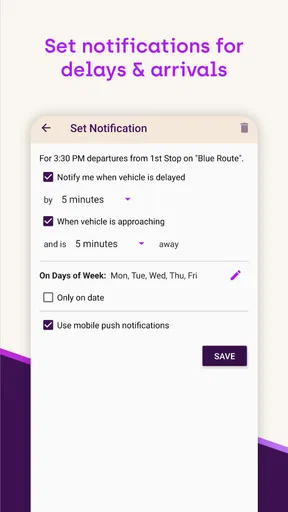
- Push notifications can alert riders about delays or schedule changes.
- Useful for workplace
- campus
- and community transportation programs.
- Trip details can make recurring commutes easier to plan.
Cons
- Availability depends heavily on whether local operators use TripShot.
- Some features may require an organization-provided account or access code.
- Route coverage can be limited outside participating campuses or employers.
- Location services may increase battery usage during active trip tracking.
- Service updates and vehicle data may occasionally be delayed or inaccurate.
FAQs for TripShot
What is TripShot and what can I use it for?
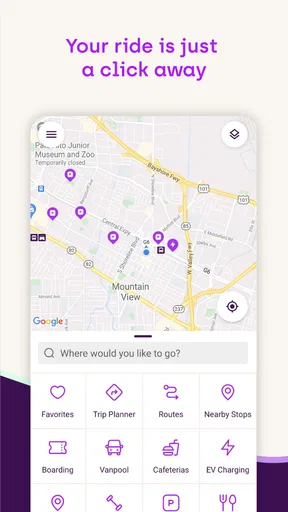
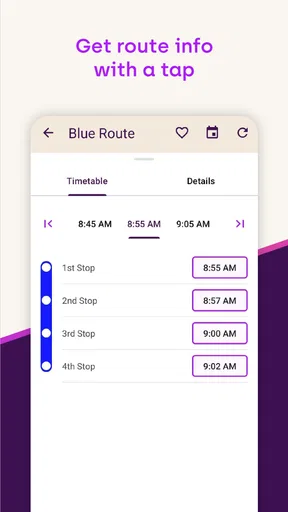
TripShot is a transportation management and trip-planning app designed to help users access shuttle, commuter, corporate, university, and other shared transportation services. Depending on the organization providing the service, you may be able to view routes, check live vehicle locations, find nearby stops, see estimated arrival times, reserve a seat, and receive service notifications. Available features can vary by location and provider.
Do I need an invitation or organization account to use TripShot?
In most cases, TripShot is connected to a specific transportation program operated by an employer, university, residential community, event organizer, or local service provider. You may need an invitation, an eligible email address, an access code, or an account created by that organization before the app will show available routes. Downloading the app alone does not necessarily provide access to every TripShot service.
Can TripShot track vehicles and show real-time arrival information?
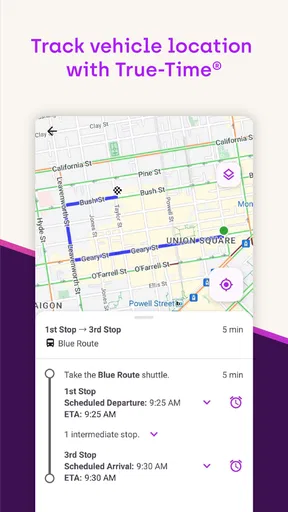
Where real-time tracking is supported, TripShot can display vehicle locations, estimated arrival times, route progress, and stop information. The accuracy depends on GPS availability, the operator’s tracking equipment, traffic, weather, and the quality of the service data supplied by the transportation provider. If tracking is unavailable, the app may show scheduled times instead of live updates.
Does TripShot allow reservations, ticketing, or mobile payments?
TripShot may support reservations, digital passes, fare information, or mobile payments, but these options depend entirely on the transportation program connected to your account. Some services are free and require only eligibility verification, while others may charge fares or limit bookings. Before relying on the app for a journey, check the available payment, cancellation, and reservation rules for your specific provider.
What permissions and personal information does TripShot require?
TripShot may request location access to identify nearby stops, provide location-based trip information, or improve vehicle tracking. It can also use notifications for arrival alerts, route changes, and service announcements. Account details such as your name, email address, organization affiliation, or booking history may be required. Review the app’s current privacy policy and your device permission settings before creating an account.


